

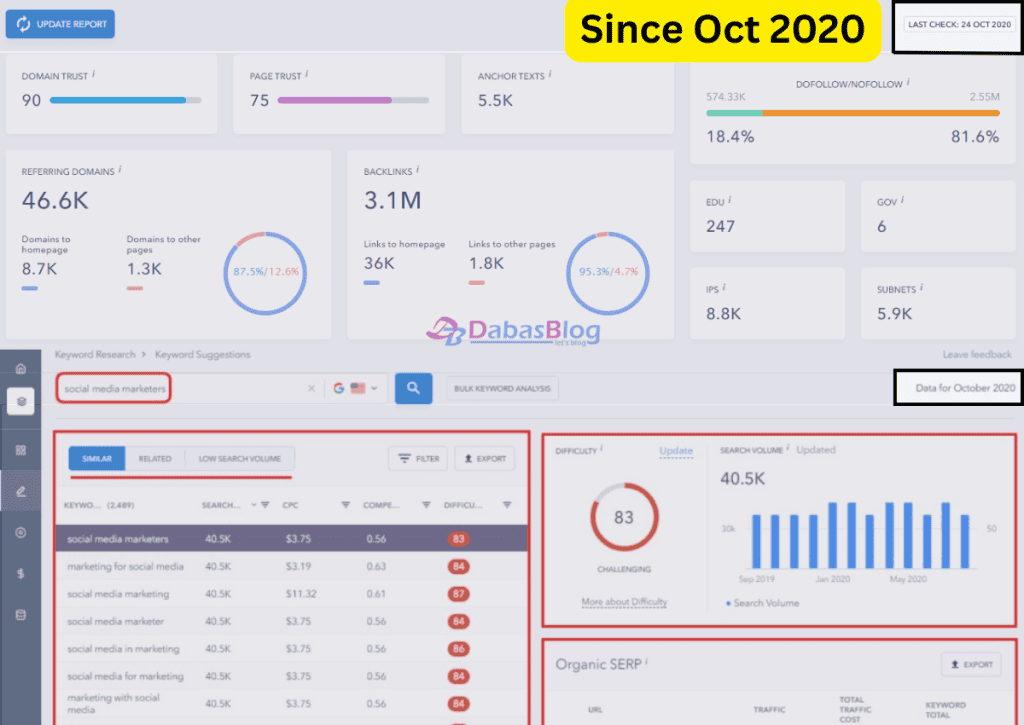
I first started using SE Ranking in October 2020 to track my blog’s keyword rankings, research keywords, monitor competitors, and identify technical SEO issues. I chose it because I wanted an affordable SEO platform that covered the essential tools without paying the higher prices charged by alternatives like Semrush and Ahrefs.
Over the years, I’ve explored several of its features, including Rank Tracker, Keyword Research, Website Audit, Competitor Research, and Backlink Checker. I’ve also paid for the software with my own money, so my experience isn’t solely on a free trial or a product demonstration.
I’ll share my hands-on experience with its features, along with an in-depth look at its current plans, pricing, and limitations.
In this SE Ranking Review, I’ll cover:
- How its main SEO features work and where they fall short.
- What you get with its current pricing plans.
- SE Ranking’s biggest advantages and disadvantages.
- How it compares with Semrush and Ahrefs.
- Whether SE Ranking is worth considering for bloggers, freelancers, and SEO agencies.
My goal is to help you make an informed decision — not simply convince you to purchase another SEO tool.
Affiliate Disclosure: This article contains affiliate links. If you purchase SE Ranking through my one of my links, I may earn a commission at no additional cost to you. This doesn’t influence my opinions or recommendations.
💡 Why Trust This Review?
✅ First-Hand Experience since Oct 2020 (6+ years)
✅ Practical SEO experience
✅ Independent assessment
✅ Updated product information
📋 What You’ll Learn in This SE Ranking Review
- My experience with SE Ranking and why I initially chose it.
- A detailed look at its major SEO features, including Rank Tracker, Keyword Research, SE Visible, Backlink Checker, etc.
- SE Ranking pricing, available plans, and additional costs.
- The platform’s biggest pros and cons.
- SE Ranking vs Semrush vs Ahrefs: How do they compare?
- Who should use SE Ranking and who should consider an alternative.
- Whether SE Ranking offers good value for money in 2027.

Quick Verdict
SE Ranking is a comprehensive SEO platform that combines keyword research, daily rank tracking, competitor analysis, backlink research, website audits, and AI search visibility tracking.
Based on my experience using the platform since 2020, I consider it a strong option for bloggers, freelancers, and small SEO teams looking for an all-in-one SEO solution.
SE Ranking at a Glance
My Verdict: SE Ranking is worth considering if you want multiple essential SEO tools under one platform. However, compare its plan limits, additional costs, and feature requirements before choosing a subscription.
You can explore its features through the 14-day free trial before making a purchase.
No Credit Card Required • Cancel anytime • Explore Premium Features

SE Ranking Review
What is SE Ranking?
SE Ranking is an all-in-one SEO platform that helps website owners, bloggers, freelancers, and agencies manage different aspects of search engine optimization from one dashboard.
Instead of using separate tools for keyword research, rank tracking, competitor analysis, backlink monitoring, and technical SEO audits, you can access these essential SEO functions within SE Ranking.
The platform also offers content optimization, local marketing, and AI search visibility features, depending on your plan and selected add-ons.
My Experience: Why I Chose SE Ranking in 2020
I first subscribed to SE Ranking in October 2020 when I was looking for an affordable SEO tool to manage my blog’s search performance.
At that stage of my blogging journey, I didn’t want to spend heavily on multiple premium SEO subscriptions. I needed a platform that could help me:
- Track my blog’s keyword rankings in Google.
- Find relevant keywords before publishing new articles.
- Analyze competitors and discover content opportunities.
- Monitor backlinks pointing to my website.
- Identify technical SEO issues through website audits.
SE Ranking offered these essential capabilities under one platform, which made it a practical choice for my blogging needs.
Over the years, I explored its different tools and used them as part of my SEO workflow. My experience wasn’t limited to checking keyword positions; I also evaluated its keyword research, competitor analysis, backlink monitoring, and website audit capabilities.
That’s the perspective behind this review: an evaluation from a blogger who has paid for and used the platform, rather than someone reviewing it after simply exploring a free trial.
👥Who Should Use SE Ranking?
SE Ranking isn’t designed exclusively for SEO agencies. It is a combination of various SEO tools that makes it useful for different types of website owners and SEO professionals.
Here are the users who may benefit most from the platform.
- Bloggers and Website Owners
If you run a blog or content-based website, SE Ranking can help you find keyword opportunities, monitor organic rankings, analyze competitors, and identify technical SEO problems.
You can use these insights to plan new content and improve existing articles without subscribing to several separate SEO tools.
- Freelance SEO Consultants
Freelancers managing SEO for multiple clients can use SE Ranking to monitor keyword performance, research competitors, audit websites, and prepare SEO reports.
Its reporting and project management capabilities can also help organize client work, depending on the selected plan.
- Small SEO and Digital Marketing Agencies
Small agencies that need an integrated SEO workflow may find SE Ranking useful for managing multiple projects and monitoring client performance.
Features such as competitor research, website auditing, and white-label reporting can support regular SEO reporting and campaign management.
- Small Businesses and Marketing Teams
Businesses managing their own websites can use SE Ranking to monitor search visibility, identify keyword opportunities, and keep track of technical SEO issues.
It’s particularly useful when a team wants access to several SEO functions through one platform rather than managing multiple subscriptions.
❌ Who Shouldn’t Use SE Ranking?
Although SE Ranking covers many essential SEO tasks, it may not be the right choice for everyone.
Here are some situations where you may want to consider another tool.
- SEO Professionals Focused Primarily on Link Building
If your primary work involves large-scale backlink research, link prospecting, and detailed competitor backlink analysis, you may prefer a specialized backlink research platform such as Ahrefs.
SE Ranking offers backlink analysis and monitoring, but you should compare the database coverage and research capabilities before choosing it for link-building-heavy workflows.
- PPC-Focused Marketers
SE Ranking is primarily an SEO platform. If your work revolves around advanced Google Ads research, paid keyword analysis, and PPC competitor intelligence, a platform with more extensive advertising research capabilities may be a better fit.
- Enterprise Teams With Complex Requirements
Large organizations often need advanced reporting, extensive integrations, API access, custom workflows, and specific account management arrangements.
Before choosing SE Ranking, enterprise teams should check whether its available plans and additional services meet their operational requirements.
- Users Looking For a Permanently Free SEO Platform
SE Ranking offers a free trial rather than a permanently free version of its complete SEO platform.
If you don’t want to pay for an SEO subscription, you may need to combine free tools such as Google Search Console and other free keyword research resources instead.
SE Ranking Pricing 💰
SE Ranking offers three main subscription options: Core, Growth, and Enterprise. The Core and Growth plans are available with monthly and annual billing, while Enterprise pricing is customized according to your requirements.
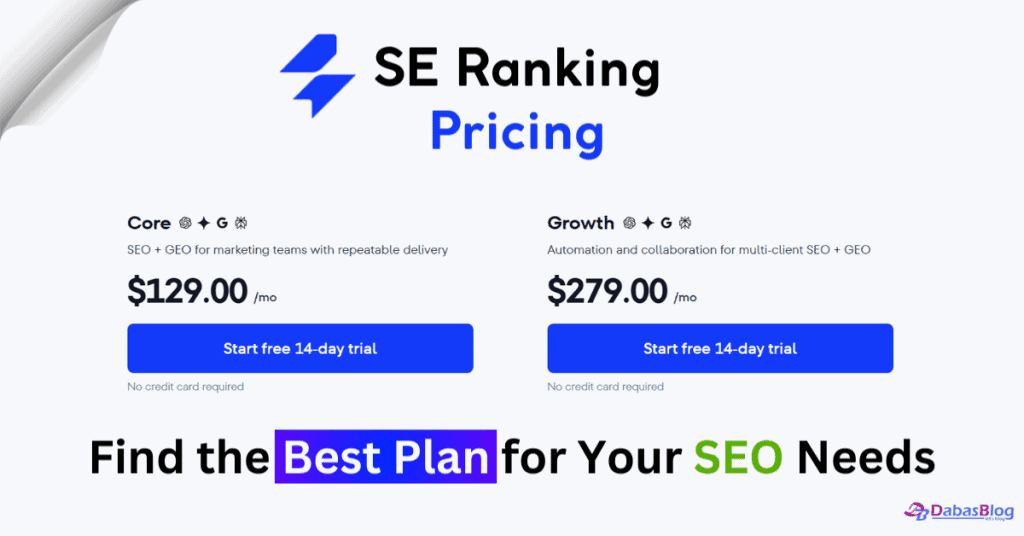
The Core and Growth plans are designed for individual professionals and growing SEO teams, while Enterprise offers customized solutions for larger organizations.
SE Ranking also provides a 14-day free trial, allowing you to explore its SEO tools before committing to a paid subscription.
Current Pricing Plans (Monthly Billing)
|
Plan |
Core |
Growth |
Enterprise |
|---|---|---|---|
|
Monthly Price |
$129/mo |
$279/mo |
Custom |
|
Annual Price (Monthly equivalent) |
$103.20/mo |
$223.20/mo |
Custom |
Annual billing is available at a 20% lower cost ($103.20, $223.20 respectively).
However, the right plan depends on your website requirements, keyword tracking limits, number of projects, and additional features you need.
If you’re a blogger or solo SEO professional, start by evaluating the Core plan. Freelancers managing multiple client websites may benefit from Growth, while larger agencies can explore Enterprise.
Is SE Ranking worth its subscription cost?
In my opinion, it can be a worthwhile investment if you regularly use its keyword research, rank tracking, competitor analysis, and website audit tools.
For a detailed breakdown of subscription prices, features, plan limits, add-ons, and available discounts, read my complete SE Ranking Pricing Guide.
SE Ranking Features Breakdown
SE Ranking brings several essential SEO tools together in one platform. During my time using it, I explored its keyword research, rank tracking, competitor analysis, backlink monitoring, and website auditing features.
Rather than listing every tool available, I’ll focus on the features that matter most to bloggers, website owners, and SEO professionals. I’ll also discuss their practical benefits, limitations, and where dedicated alternatives may offer more value.
Rank Tracker: Monitor Your Keyword Positions
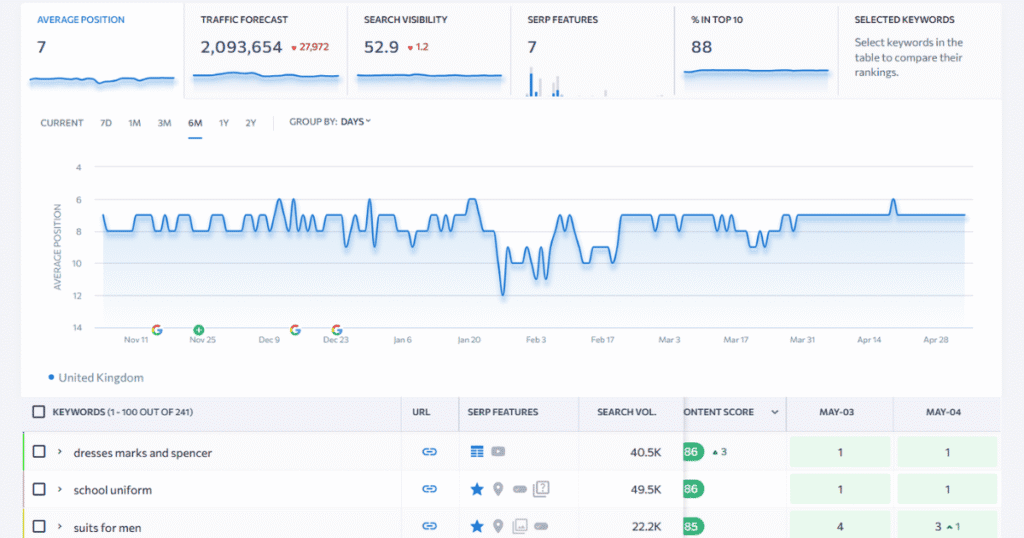
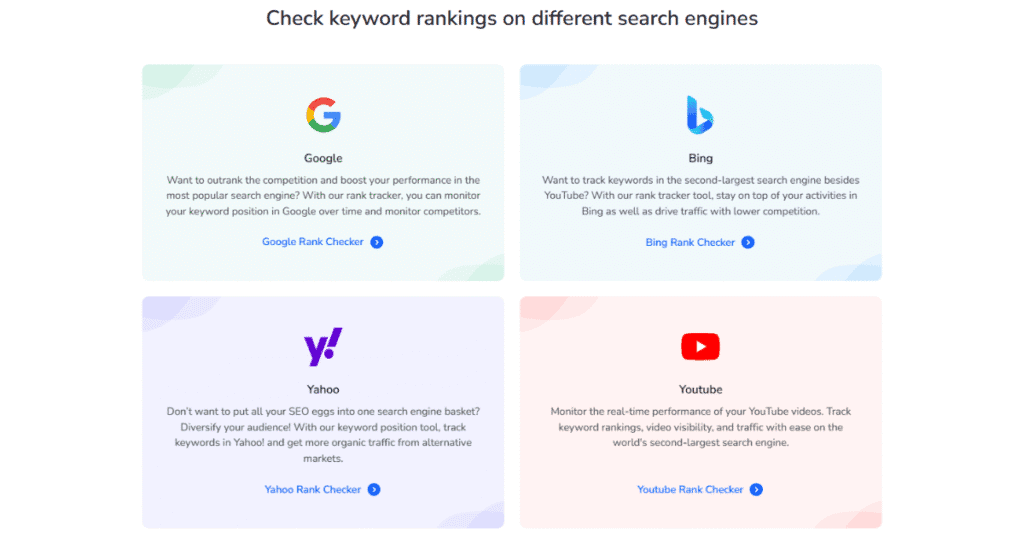
Rank Tracker was one of the main reasons I initially subscribed to SE Ranking in 2020. It helps you monitor how your website’s target keywords perform in search results across different search engines, locations, and devices.
For bloggers and SEO professionals, tracking keyword positions is important because publishing an article is only the first step. You also need to understand whether it is gaining visibility, losing rankings, or improving over time.
Key Rank Tracking Features
1. Location-Specific Rank Tracking
You can monitor keyword rankings for different countries, regions, and locations. This is particularly useful if your website targets audiences in multiple markets, such as India and the United States.
2. SERP Feature Tracking
Rank Tracker provides insights into search engine result page features, such as featured snippets and other enhanced search results. This helps you understand your visibility beyond traditional organic rankings.
3. Competitor Rank Tracking
You can compare your keyword positions with competitors to identify ranking gaps and understand which websites are performing better for your target keywords.
4. Historical Ranking Data
Historical ranking reports help you analyze keyword performance over time. Instead of focusing on daily fluctuations, you can identify longer-term improvements and ranking declines.
5. Mobile and Desktop Tracking
You can monitor keyword performance across different device types to understand how your search visibility varies between mobile and desktop results.
Where Rank Tracker Falls Short
Although Rank Tracker covers the essential monitoring requirements, there are a few things to consider:
- Not real-time tracking: Keyword positions are updated according to the selected tracking frequency rather than reflecting every live change in Google.
- Usage limits: The number of keywords you can track depends on your subscription and selected tracking settings.
- Ranking fluctuations: Search positions can change frequently, so individual daily movements shouldn’t be treated as definitive performance improvements or losses.
👉 My Verdict: Rank Tracker is one of SE Ranking’s strongest features. It provides bloggers and SEO professionals with a convenient way to monitor keyword performance, compare competitors, and evaluate ranking trends without manually checking search results.
My rating: ⭐⭐⭐⭐½ (4.5/5) — A useful rank tracking solution for bloggers and small SEO teams.
Want to learn how to use it effectively? Read my Complete SE Ranking Rank Tracker Guide.
Website Audit: Find and Fix Technical SEO Issues
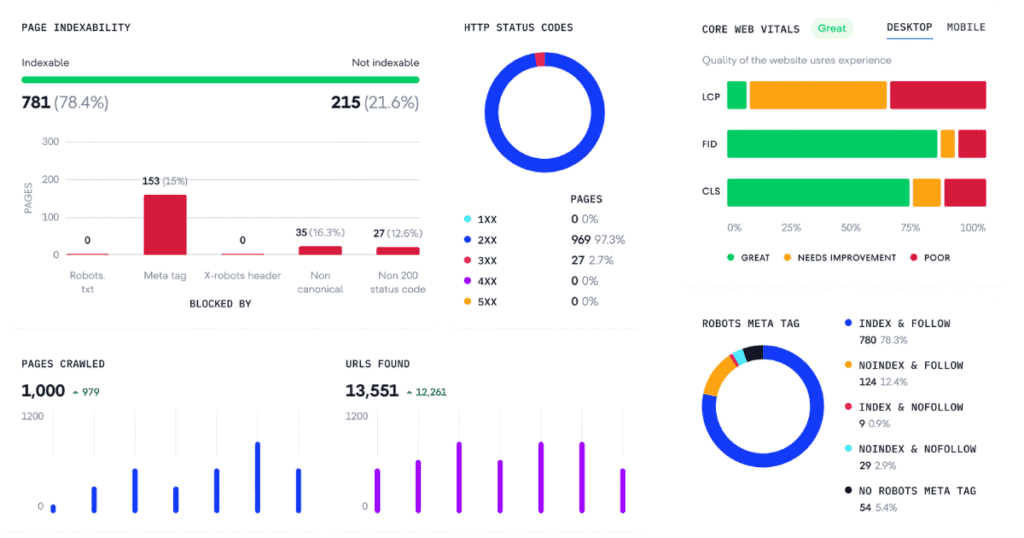
SE Ranking’s Website Audit helps you identify technical SEO issues that may affect your website’s crawlability, indexability, performance, and overall search health.
It checks more than 115 website metrics and organizes detected issues by priority, making it easier to understand which problems need attention first.
For bloggers and website owners, this is particularly useful because technical issues can go unnoticed as a website grows.

What Can You Check With Website Audit?
1. Broken Links and Redirects
The tool identifies broken internal and external links, HTTP errors, and redirect-related issues. This helps you find outdated URLs and fix linking problems that may affect user experience and website navigation.
For example, when I deleted three old blog posts but forgot to update the internal links pointing to them, the audit identified 15 broken links that I might otherwise have missed.
2. Duplicate and Missing Meta Information
Website Audit checks page titles, meta descriptions, H1 tags, and other on-page elements. It helps identify missing or duplicate metadate so you can review and improve affected pages.
3. Image Optimization
It identifies images with missing alt attributes and other image-related issues. Description alt text helps search engines understand image content and improves accessibility.
4. Page Speed and Core Web Vitals
The audit provides information about website performance, loading-related issues, and Core Web Vitals. You can use these reports to identify pages that need further performance optimization.
5. Crawlability and Indexability
It checks HTTP status codes, robots directives, canonical tags, sitemap-related issues, internal links, HTTPS implementation, and other technical SEO parameters.
Additional Website Audit Capabilities
SE Ranking also provides:
- A website health score to summarize technical SEO conditions.
- Priority-based issue reports to help organize fixes.
- Scheduled audits for regular monitoring.
- JavaScript rendering for websites that load important content dynamically.
- Configurable crawling settings, including page limits and access to restricted pages.
The available crawling capacity depends on your subscription plan.
Limitations of Website Audit
Although the tool covers most essential technical SEO checks, there are a few things to keep in mind:
- Learning curve: Beginners may need some time to understand the different audit categories and prioritize issues.
- Manual verification: Not every flagged issue requires an immediate fix. You should review each recommendation in the context of your website.
- Crawling restrictions: Firewalls, hosting restrictions, and crawler access settings can sometimes prevent a complete audit.
My Verdict: SE Ranking’s Website Audit is a useful tool for identifying technical SEO issues and maintaining website health. Its priority-based reporting makes it particularly helpful for bloggers and small website owners who want to keep track of technical problems without relying entirely on manual checks.
My rating: ⭐⭐⭐⭐ (4/5) — A solid technical SEO auditing tool with useful reporting and monitoring capabilities.
Backlink Checker: Analyze Your Website’s Backlink Profile
Backlinks play an important role in SEO, and understanding which websites link to your domain can help you evaluate your website’s link profile.
SE Ranking offers two related tools: Backlink Checker and Backlink Monitor. Backlink Checker helps you discover and analyze backlinks pointing to any domain or URL, while Backlink Monitor focuses on tracking selected backlinks over time.
Key Backlink Checker Features
1. Backlink and Referring Domain Analysis
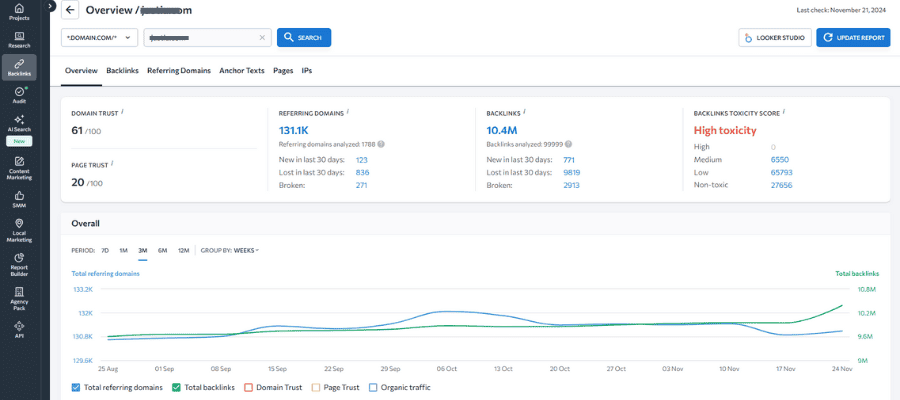
You can analyze the backlinks pointing to a website and see how many unique referring domains link to it. This helps you understand the size and diversity of a website’s backlink profile.
2. Dofollow and Nofollow Links
SE Ranking identifies different backlink attributes, including dofollow and nofollow links. This makes it easier to understand the types of links pointing to a website.
3. Anchor Text Analysis
The tool shows the anchor texts used by other websites when linking to your pages. Reviewing anchor text distribution can help identify patterns and understand how your website is being referenced across the web.
4. Toxicity Score
SE Ranking assigns a Toxicity Score to backlinks to help identify links that may require further investigation.
However, don’t automatically disavow every backlink flagged as toxic. Review the referring website, link context, and overall backlink profile before taking action. A third-party toxicity score alone doesn’t mean Google considers a link harmful.
5. New and Lost Backlinks
You can examine newly discovered and lost backlinks to understand how a website’s link profile changes over time. For ongoing monitoring of selected backlinks, SE Ranking also provides its separate Backlink Monitor tool.
Where SE Ranking Falls Short
Although SE Ranking covers the essential backlink research requirements, its database coverage may not be sufficient for every link-building workflow.
- Database coverage: For extensive backlink prospecting and large-scale competitor research, I would also consider specialized platforms such as Ahrefs and Majestic.
- Data freshness: Backlink tools depend on their own crawling and indexing processes. A backlink may not appear immediately after it is published.
- Advanced link research: Professionals running large link-building campaigns may prefer additional backlink research and prospecting capabilities.
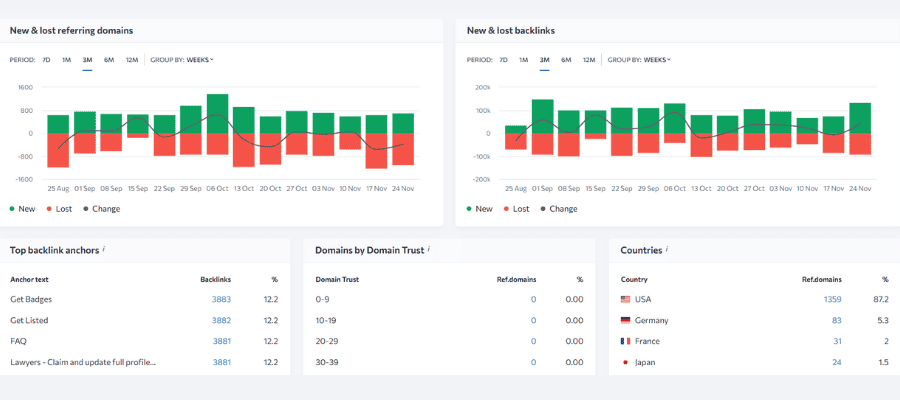
My Verdict: SE Ranking’s Backlink Checker is useful for understanding backlink profiles, reviewing referring domains, examining anchor texts, and identifying potential link-quality concerns. Its combination of backlink research and monitoring tools makes it a practical addition to an all-in-one SEO platform.
However, if backlink analysis is your primary SEO activity, compare its database coverage with dedicated backlink research tools before making a decision.
My rating: ⭐⭐⭐½ (3.5/5) — Useful for routine backlink research and monitoring, but not my first choice for extensive link-building campaigns.
Competitor Research
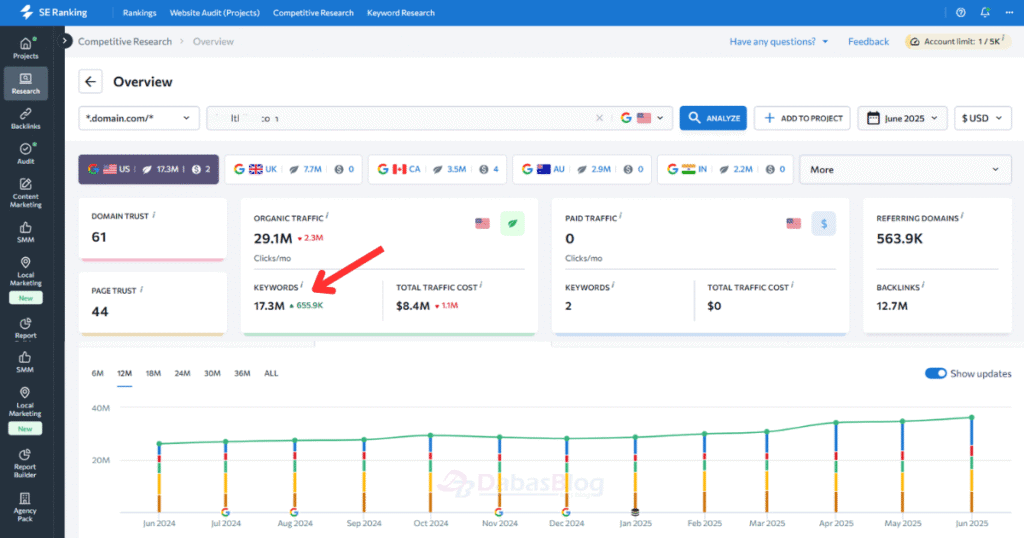
Competitor research means analyzing other websites in your niche to understand why they rank higher than you. Which keywords are they targeting? What content format works for them? How strong is their backlink profile? SE Ranking answers these questions without requiring you to manually research each competitor.
I analyze top-ranking competitors regularly to understand what’s working in my niche. This seo tool helps me see which keywords they rank for, how much traffic they’re getting, and where their backlinks come from.
Features I Actually Use
1. Top Competitor Keyword Lists
SE Ranking shows me every keyword a competitor ranks for in organic search—sorted by position, search volume, and keyword difficulty. This is a goldmine of data for content planning.
How I use it:
- Enter a competitor’s domain
- Filter for keywords ranking in positions 1–10
- Scan the list for topics I haven’t covered yet
If a competitor ranks for “best blogging tools for beginners” and I don’t have that post, I add it to my content calendar.
Why it’s useful: You’re not guessing what content to create—you’re seeing what already works in your niche.
2. Estimated Organic Traffic
SE Ranking estimates the monthly traffic competitors receive from organic search. This helps me identify which competitors are genuine threats versus those with inflated domain authority but low actual traffic.
Example:
- A site with 10,000 backlinks but only 2,000 monthly visitors usually has weak content
- Another site with 500 backlinks and 15,000 monthly visitors clearly has better content and intent match
I prioritize learning from the second type of site.
3. Top Performing Pages
SE Ranking shows which specific pages drive the most traffic for competitors. This reveals their content strategy—are they winning with long-form guides, product reviews, or comparison posts?
I noticed one competitor gets 40% of their traffic from 5–6 pillar posts, not hundreds of thin posts. This shifted my own strategy from quantity to quality.
What Works Well in Competitor Research
- 30% larger keyword database (2024 updates) in many markets improves competitor keyword discovery
- Domain & Page Trust metrics help you see if rankings come from authority or just better content
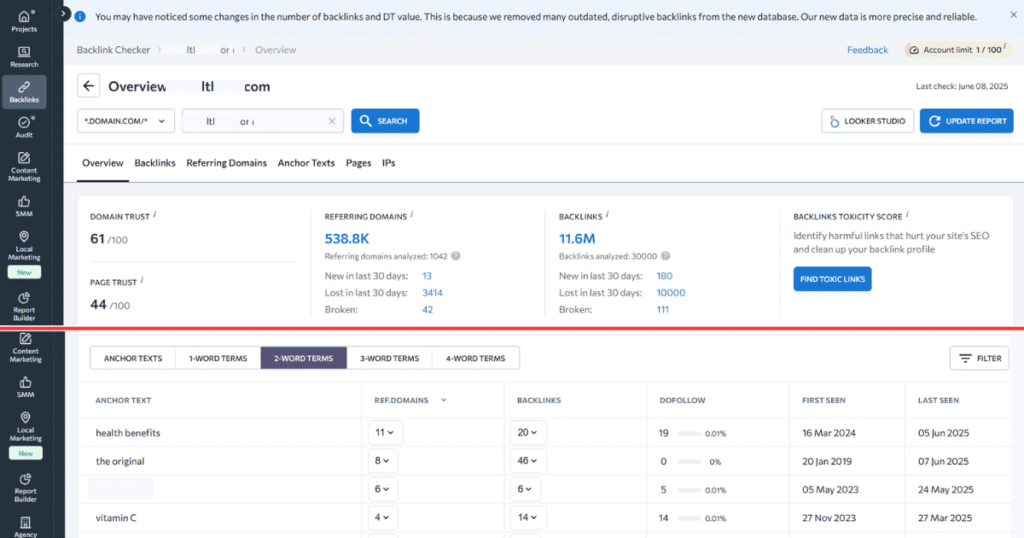
- Backlink Gap feature shows which sites link to your competitors but not you—perfect for outreach planning
Where SE Ranking Falls Short?
- Traffic estimates are modeled, not exact—great for relative comparisons but not for precise numbers
- No real-time competitor alerts when they publish new content or start ranking for new keywords
- Visualizations are basic (tables, lists) vs flashy graphs you see in some expensive tools
My rating: ⭐⭐⭐½ (3.5/5) — Very good data for bloggers and small agencies, but workflow could be smoother for heavy-duty agency use.
Read more: Complete SE Ranking Competitor Analysis Guide
Keyword Research Tool 🔑
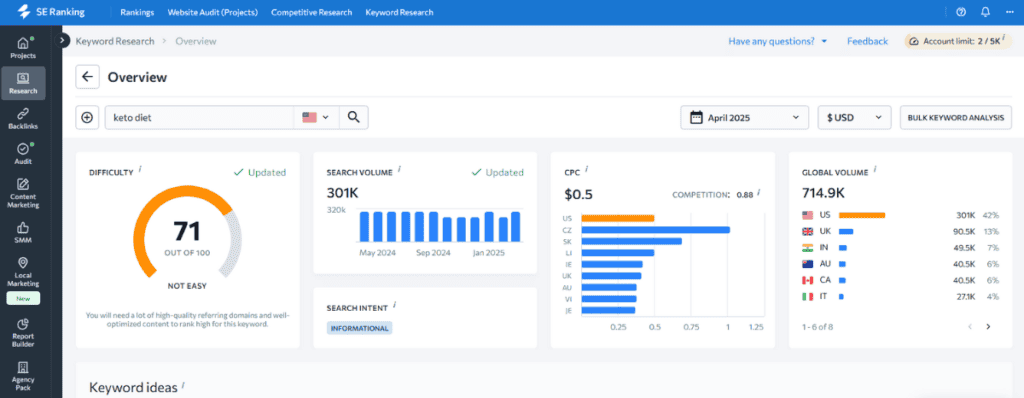
Keyword research means finding what your audience actually types into Google. If you write about “blog tips” but people search for “blogging tips for beginners”, you’re missing traffic. SE Ranking’s keyword research tool shows what people search for, how often, and how hard it is to rank for those terms.
Before writing any major blog post, I open SE Ranking’s keyword tool. It has become my starting point for every content idea.
Metrics I Check (And Why They Matter)
1. Search Volume (Monthly)
Shows how many people search for a keyword each month, with country-specific data (India vs US etc.).
- Don’t only chase 10,000+ volume keywords
- 500–2,000 search volume long-tail keywords often convert better because they’re more specific
2. Keyword Difficulty (0-100 Scale)
SE Ranking’s difficulty score estimates how competitive a keyword is based on who is ranking on page 1.
- 0-30: Easy (newer blogs can rank within months)
- 31-60: Medium (requires decent content and backlinks)
- 61-100: Hard (dominated by authority sites)
My strategy:
About 70% of my content targets difficulty under 40, and 30% targets 40–60 as long-term bets.
3. CPC (Cost Per Click)
CPC reveals commercial intent. If advertisers pay $5+ per click, that keyword usually has strong buyer intent.
- For affiliate/commercial posts: prioritize CPC ≥ $3
- For purely informational posts: CPC is less important
4. Related Keywords and Questions
SE Ranking suggests:
- Related phrases
- Question-based keywords
- Long-tail variations
The “Questions” tab often gives me ready-made H2/H3 headings for my content.
How do I Use the Keyword Tool in Practice?
- Step 1: Enter a seed keyword (like “keto diet”)
- Step 2: Filter by search volume (500-5,000) and difficulty (under 40)
- Step 3: Export related keywords and questions
- Step 4: Group them into topic clusters:
- “keto diet”
- “keto diet plan for beginners”
- “how to start keto diet”
- “keto diet benefits”
- “keto diet breakfast ideas”
- “low carb diet vs keto”
- Step 5: Check CPC to understand commercial value
What Makes SE Ranking’s Keyword Tool Stand Out?
- Keyword grouping into logical clusters makes planning content around a topic much easier
- Built-in SERP analysis shows the top 10 results, their authority, backlinks, and word count
- Search intent labels (informational, commercial, transactional) prevent content-intent mismatch
Limitations?
- Search volume estimates, like every seo platform, are approximations, not exact truth
- Ultra-long-tail (5–7 word) phrases are fewer than in giants like Ahrefs
- For massive keyword research campaigns (millions of keywords), you may outgrow it
My rating: ⭐⭐⭐⭐½ (4.5/5) — One of SE Ranking’s strongest features for bloggers and small business sites.
Read more: SE Ranking Keyword Research Complete Guide

SE Ranking Exclusive Features ⚡
AI Search Toolkit (Deep Dive) 🤖
We already introduced this in the “What’s New” section. Now let’s examine its practical SEO impact in 2026.
What the AI Search Toolkit tracks:
- Whether your content appears in Google AI Overviews (the AI-generated answer boxes at the top of search results)
- If your brand or pages are cited inside ChatGPT, Perplexity, and Gemini responses
- How often you’re mentioned versus competitors across AI search platforms
- Your “share of voice” in AI-generated answers for your target topics
Why this matters in 2026:
AI Overviews and conversational AI answers are increasingly pushing traditional blue links down the page. You could rank position 3 organically, but if an AI Overview captures most clicks, your traffic suffers.
According to industry data, AI Overviews now appear for 92% of commercial queries in some industries. If you’re not tracking AI visibility, you’re only seeing half the picture of your true search presence.
Real World Application:
I discovered through SE Ranking’s AI toolkit that one of my posts was cited in ChatGPT responses for “blogging tools” queries, even though it ranked position 12 organically. That AI citation brought referral traffic I would never have known about without this feature.
For anyone serious about ranking and visibility in 2026 and beyond, this is a significant competitive advantage over seo tools that only track classic SERP positions.
Content Marketing Module ✍️
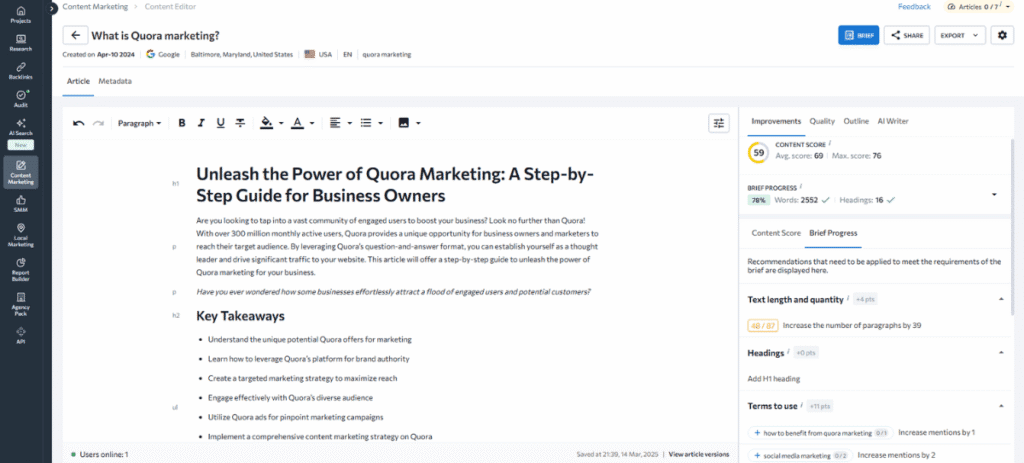
SE Ranking’s Content Editor competes directly with tools like NeuronWriter, Surfer SEO, and Clearscope.
What it does:
- Enter your target keyword → the tool analyzes the top 10 ranking pages
- Provides recommendations for:
- Optimal word count based on competitors
- Related terms and LSI keywords to include naturally
- Suggested heading structure (H2s, H3s)
- Readability scores and on-page seo optimization tips
- Real-time content scoring (0-100) as you write
How I use it:
Before writing a major post, I run the Content Editor analysis to understand:
- What depth competitors are providing (are top posts 2,000 or 5,000 words?)
- Which semantic keywords appear consistently across top-ranking content
- What heading structure patterns does Google seem to favor for that query
👉 Like NeuronWriter, don’t blindly chase keyword counts. The Content Editor might suggest using “keyword research” 7 times, but if forcing it makes your writing unnatural, ignore it. Google’s algorithms in 2026 prioritize natural language and genuine depth over exact keyword frequency.
Use the Content Editor as a guide, not a rulebook.
My rating: ⭐⭐⭐½ (3.5/5) — Helpful for content briefs, but requires manual judgment. Available as a paid add-on ($29/month).
SERP Tracker🔍
Before writing a comprehensive post (like this in-depth review of SE Ranking), I always run SERP analysis first.
What it shows:
- The current top 10 ranking pages for any keyword
- Average word count of those pages
- Number of backlinks each page has
- Domain authority scores
- Types of content formats (reviews, comparisons, listicles, guides)
- SERP features present (featured snippets, People Also Ask, video carousels)
How this informs my content strategy:
For “keto diet for beginners“, SERP analysis revealed:
- Top posts average 4,500-5,500 words
- Most have 80+ referring domains
- All include keto food charts
- Several pages embed videos
Why it’s valuable:
You’re not guessing what Google wants—you’re seeing exactly what’s already winning.
My rating: ⭐⭐⭐⭐ (4/5) — Essential for content planning and competitive research.
Read more: Complete SE Ranking SERP Analyzer Guide
White Label Reporting 📊 (Essential for Agencies)
If you’re a freelancer or agency managing client accounts, white-label reporting is invaluable.
What it includes:
- Remove all SE Ranking branding from reports
- Add your agency’s logo, colors, and custom domain
- Schedule automated reports (daily, weekly, monthly)
- Export in multiple formats (PDF, Excel, CSV)
- Provide client portal access with guest logins
- Integration with Looker Studio for live dashboards
Why Agencies love it:
Instead of sending reports branded with “SE Ranking,” clients see your agency branding throughout. This looks far more professional and reinforces your brand, not the tool vendor’s.
Pricing Note:
White-label reports are included in Pro and Business plans only (not Essential).
My experience:
After upgrading to Pro, white-label reports saved me 3-4 hours monthly. I schedule automated reports for clients, and they receive professionally branded PDFs without any manual work from me.
Additional Power Tools
1. Page Changes Monitor
Track specific competitor pages for content updates, meta tag changes, or structural modifications. SE Ranking alerts you when significant changes occur.
Use case: I monitor my top 5 ranking competitors. When they update their content significantly, I receive an alert and can decide whether I need to refresh my own content to stay competitive.
2. On-Page SEO Checker ✅
Analyzes individual pages for optimization opportunities:
- Title and meta description issues
- Heading structure (H1, H2, H3)
- Keyword density and placement
- Image alt text optimization
- Internal linking suggestions
- Content length compared to competitors
My practice: After publishing, I run the On-Page Checker to catch last-minute optimization misses before Google indexes the page.
3. Social Media Management 📱
SE Ranking includes basic social media scheduling and analytics for Facebook, Twitter, and Instagram.
Honest assessment: I don’t use this feature much (I prefer dedicated tools like Buffer). But if you want an all-in-one seo platform that covers social scheduling too, it’s available.
4. Marketing Plan Builder
Generates a customized SEO roadmap based on your website audit results, competitor analysis, and keyword research. Prioritizes tasks by potential impact and difficulty.
Good for: Teams needing structured workflow management and task prioritization.
5. Lead Generator Tool
Finds businesses in your niche with poor SEO, including contact information and basic audit summaries. Designed for freelancers and agencies doing cold outreach.
Why it’s useful: If you’re prospecting for new clients, this tool identifies businesses that clearly need SEO help and provides ready-made talking points for your pitch.
These features show SE Ranking isn’t standing still—they’re actively innovating to stay relevant as search evolves toward AI-powered results.
My assessment: The SE Ranking tool I use today offers significantly more value than what I subscribed to in 2020, yet the price has only increased modestly. That’s rare in the SEO tool industry.
SE Ranking Alternatives
Choosing the right SEO tool depends on your specific needs, budget, and workflow. Here’s an honest comparison of SE Ranking against its main competitors, based on real-world use cases.
SE Ranking vs Semrush
Semrush is the industry giant with the most comprehensive feature set. But is it worth the extra cost?
|
Feature |
SE Ranking |
Semrush |
|---|---|---|
|
Starting Price |
$129/mo |
$139/mo |
|
Keyword Database |
5.4 billion |
26.9 billion |
|
Backlink Index |
2.9T |
25T |
|
Rank Tracking |
Daily, all plans |
Daily, all plans |
|
PPC Tools |
Basic |
Advanced |
|
Content Marketing |
Add-on (+$29/mo) |
Included (Guru+) |
|
White Label |
Pro+ ($119/mo) |
Guru+ ($249/mo) |
|
AI Search Tracking |
✅ |
✅ |
|
Best For |
Bloggers, SMBs, freelancers |
Agencies, enterprises |
When SE Ranking wins:
- Your budget is $129-$279 per month and you need core SEO features
- You primarily focus on rank tracking, site audits, keyword research, and basic competitor analysis
- You need white-label reports but can’t justify $249/month for Semrush Guru
- You’re a blogger or small agency managing 5-15 websites
When Semrush wins:
- You run heavy PPC campaigns and need advanced Google Ads analysis
- You want the largest keyword and backlink databases in the industry
- You need advanced content marketing suite, social media management, and PR tools in one platform
- You’re an enterprise or large agency with 20+ client accounts and unlimited budget
Real-world comparison:
I’ve used both extensively. For my blogging business, SE Ranking provides everything I need at 47% less cost than Semrush. The only time I miss Semrush is when doing deep PPC competitor research—but since I focus on organic SEO, that’s rare.
Simple decision rule:
- Solo blogger / freelancer / small agency (1-10 clients) → SE Ranking
- Mid-size agency (10-50 clients, PPC-heavy) → Semrush
SE Ranking vs Ahrefs
Ahrefs is the undisputed king of backlink analysis. But does everyone need that depth?
|
Feature |
SE Ranking |
Ahrefs |
|---|---|---|
|
Starting Price |
$129/mo |
$129/mo |
|
Backlink Database |
2.9T backlinks, 357M domains |
28T backlinks, 500M domains |
|
Rank Tracking |
Daily updates |
Daily updates |
|
Keyword Research |
5.4 B+ keywords |
19 B+ keywords |
|
White Label |
✅ Pro+ |
❌ Not available |
|
AI Search Tracking |
✅ |
❌ |
|
Site Audit |
115+ checks |
140+ checks |
|
Best For |
Rank tracking, audits, budget-conscious |
Link building, massive databases |
When SE Ranking wins:
- Your main focus is keyword rankings, on-page seo, and website audits
- You need “good enough” backlink data, not the industry’s largest database
- You want white-label reporting for clients (Ahrefs doesn’t offer this)
- You’re working within a tight budget but still need a professional seo platform
- You want to track AI Search visibility (ChatGPT, AI Overviews)—Ahrefs doesn’t have this yet
When Ahrefs wins:
- Your primary work is link building (agency, outreach, digital PR)
- You need the most comprehensive backlink database in the industry
- You analyze detailed historical link data going back 3-5 years
- You want the fastest backlink index updates (Ahrefs updates faster than SE Ranking)
My honest take:
For link-building specialists, Ahrefs is worth the premium. For everyone else doing general SEO work (bloggers, content marketers, small agencies), SE Ranking provides 80% of the functionality at half the cost.
I keep an Ahrefs subscription for quarterly deep-dive competitor backlink research, but I use SE Ranking daily for rank tracking, audits, and keyword research.
SE Ranking vs Ahrefs: Which tool is best for SMBs?
Quick Comparison Table: All Alternatives
|
Tool |
Best For |
Starting Price |
Biggest Strength |
Biggest Weakness |
|---|---|---|---|---|
|
SE Ranking |
Bloggers, SMBs, freelancers |
$129/mo |
Value-for-money, AI tracking |
Smaller backlink index |
|
Semrush |
Agencies, enterprises |
$139/mo |
Largest feature set, PPC tools |
Expensive |
|
Ahrefs |
Link builders |
$129/mo |
Best backlink database |
No white-label reports |
|
Moz Pro |
DA/PA metric fans |
$99/mo |
Brand recognition |
Outdated features |
|
Ubersuggest |
Complete beginners |
$29/mo |
Cheapest option |
Limited accuracy |
Pricing verified October 2026
My Recommendation Based on Your Situation
- If you’re a blogger or content creator:
- Start with SE Ranking ($129/mo Core plan). It gives you everything needed to grow a blog—keyword research, rank tracking, and site audits—without breaking the bank.
- If you’re a freelance SEO consultant:
- Choose SE Ranking Growth ($279/mo) for white-label reports. You’ll look professional to clients while keeping your tool costs low enough to maintain healthy margins.
- If you’re running an SEO agency:
- Start with SE Ranking Enterprise (custom pricing). Only upgrade to Semrush if you’re managing 50+ client accounts or doing heavy PPC work.
- If you’re a link-building specialist:
- Get Ahrefs. The backlink database depth justifies the cost when link building is your core service.
- If you’re just testing SEO for the first time:
- Use SE Ranking’s 14-day free trial (no credit card needed). It’s more comprehensive than Ubersuggest’s trial and lets you test a real professional seo tool risk-free.
The real question isn’t “Is SE Ranking the absolute best tool?” It’s “Does SE Ranking give me everything I need to grow my SEO business profitably?” For most readers of this SE Ranking review, the answer is yes.
SE Ranking Pros and Cons
After 6+ years of daily use, here’s my honest breakdown of what works and what doesn’t.
What I Love
|
Pros |
Details |
|---|---|
|
Price |
cheaper – $129/mo vs $129-139 for Semrush/Ahrefs |
|
Free Trial |
14 days (no card) vs competitors’ 7 days |
|
Rank Tracking |
Daily updates on all plans |
|
Projects |
Unlimited on Pro/Business plans |
|
White Label |
Included on Pro+ (competitors charge extra) |
|
AI Toolkit |
Tracks ChatGPT, AI Overviews, Perplexity |
|
Search Engines |
Google, Bing, YouTube, Yahoo |
What Needs Work
|
Cons |
Details |
|---|---|
|
Backlinks |
Database 20-30% smaller than Ahrefs |
|
Large Sites |
Slower crawls for 1000+ pages |
|
Ranking Lag |
6-8 hour delay (not real-time) |
|
Limited PPC tools |
Not helpful for heavy Google Ads users |
|
API Access |
Business plan only ($259/mo) |
|
Free Plan |
No permanent free tier (only trial) |
|
Content Editor |
Needs 10-15 min tweaking per brief |
The Verdict
SE Ranking’s strengths outweigh weaknesses for bloggers, freelancers, and small agencies. You’re paying 60% less for 80% of the functionality. Limitations only matter if you’re an enterprise team or backlink research is your primary focus.
Final Thoughts on SE Ranking (Review for 2026)
If a tool makes you money, saves you time, and fits your budget, it’s a good tool.
For me, after 6+ years:
- SE Ranking has become my default seo tool
- It replaced a stack of multiple tools (rank tracker + audit + keyword research)
- The AI Search Toolkit makes it future-ready in the AI search era
Who should absolutely try SE Ranking?
- Bloggers who want to rank higher without burning $100+ every month
- Freelancers who need white-label seo reports for clients
- Small agencies who want to manage keywords, audits, and reporting in one place
Who should skip it?
- Hardcore link-building agencies → Go for Ahrefs
- PPC-focused performance marketers → Consider Semrush
My final rating for SE Ranking in 2026:
⭐⭐⭐⭐ (4.2/5) — Best value-for-money all-in-one seo tool for bloggers, freelancers, and small agencies.
Ready to Try It?
👉 Get Your 14-Day Free Trial Here (No Credit Card)
Test the rank tracker, run a full website audit, and decide if it deserves a permanent spot in your SEO stack.
Current Discount: Save up to 20% with annual billing 💰
FAQs: SE Ranking Tool
Have you tested the SE Ranking tool? What is your overall experience with the tool? Please share it in the comments section.
👉 And please, don’t forget to share it.

About Author
Nitin Dabas is your SEO guide. Expert in keywords, on-page SEO, and link-building, he has boosted rankings for countless clients. Read his blog and join his success stories.
Hi Nitin,
I was wandering for the best SEO tool that does a perfect job and comes in my budget too. This SE Ranking review has cleared all my doubts to choose the tool that is a good alternative to SEMrush.
Thank you.
Thanks, Anil. I’m glad to see that you found it useful.
Cheers!
Hi Nitin,
Thanks so much for explaining this wonderful SEO tool. It sure is a good alternative to SEMrush.
-Donna
Thanks for the lovely feedback, Donna. It’s my pleasure.
Of course, it is a good alternative to SEMrush.
Sounds like a powerful tool Nitin. Sensational review, too. Tools do help make our lives easier if we pick good ones with super functionality. SE Ranking sounds like it has the SEO juice.
Ryan
Hi Ryan,
Of course, the SE Ranking tool has great functionalities. I use it for competitive analysis and keyword research.
It’s great that you liked the tool and review. Happy weekend 😊
You explained very well Nitin.
I come to know some new points via this article. Thank you for that.
Your way of reviewing this product is next level. Keep it this.
Thank you for this post.
Keep bring such awesome content on this blog.
Thank you for such lovely feedback, Venkat. It will motivate me to create such valuable articles. Have a great blogging journey ahead!